
272 字
1 分钟
云服务器部署overleaf,实现个人latex环境搭建
很喜欢overleaf,感觉比本地vscode配置的latex环境更稳定,但是在线版有时长限制,学校也没买这个,因此决定自己部署一个挂在云服务器上的overleaf。
环境搭建
sudo apt updatesudo apt install -y docker-compose
git clone https://github.com/overleaf/toolkit.git ./overleaf-toolkitcd ./overleaf-toolkitbin/init配置端口
首先是经典的在厂商防火墙中打开1222端口:
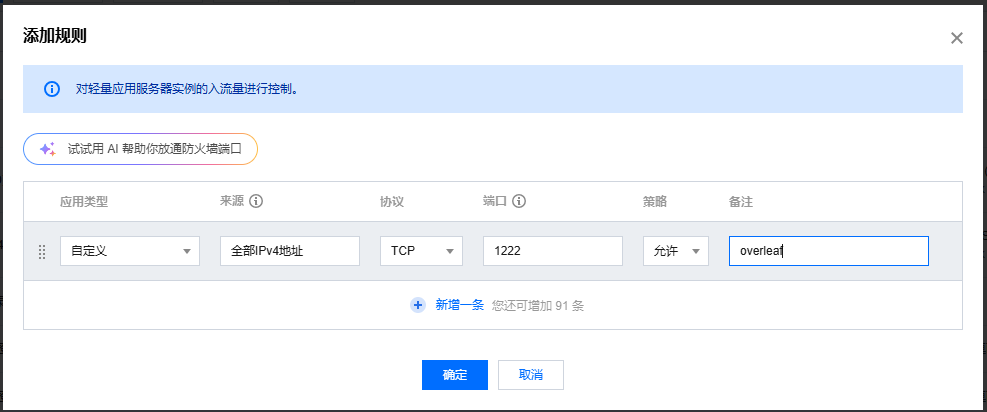
在 config/overleaf.rc文件中修改配置。
这里我计划将overleaf的web映射到其他端口I(默认是80),下面我尝试将端口配置在1222。
修改文件,把这几行改成:
SERVER_PRO=falseOVERLEAF_LISTEN_IP=0.0.0.0OVERLEAF_PORT=1222然后命令行:
sudo bin/up等一会出现一堆状态后,就可以浏览器访问<服务器ip>:1222来检查了:

但是这里是没账号密码的,可以输入<服务器ip>:1222/launchpad,手动注册一下。
然后可以ctrl+c关掉之前的命令了,用下列命令,挂在后台运行:
sudo bin/start安装 TexLive
sudo docker exec -it sharelatex bashtlmgr install scheme-fullminted包
需要安装这个
pip install Pygments中文支持
详见这两篇博客:
云服务器部署overleaf,实现个人latex环境搭建
https://fuwari.vercel.app/posts/others/overleaf-record/